

Variables
Containers for storing and reusing information in Botpress Studio.
Variables let you store information from somewhere in Botpress Studio and reuse it somewhere else.
Think of a variable like an empty box. You can fill it with any kind of information you want—like a name, a number, or a preference—and put it away for safekeeping. Then, when your bot needs that information again, it can open the box and access what’s inside.
Variable scopes
You can use different types of variables to scope the information you store. This gives you control over where your bot can access a piece of information. For example, you might want some information to:
- Follow a user across all their conversations (for example, their name and address)
- Persist only throughout a single conversation (for example, items in a virtual cart)
- Be safely accessible across all your bot’s activity (for example, API tokens and secrets)
Select any variable scope below to learn more about it:
Workflow variables
Only available within the current Workflow
User variables
Available for all conversations with a user
Conversation variables
Only available within the current conversation
Bot variables
Available throughout all your bot’s activity
Configuration variables
Available throughout all your bot’s activity, but can’t be displayed to users
Create a variable
Configuration variables have a different setup process. Check out the configuration variables page for more information.
Before you can store information in a variable, you need to create it:
- Open any Workflow.
- Select + in the Variables section at the bottom of the left navigation bar.
- Choose a Scope, Type and Name for your variable:
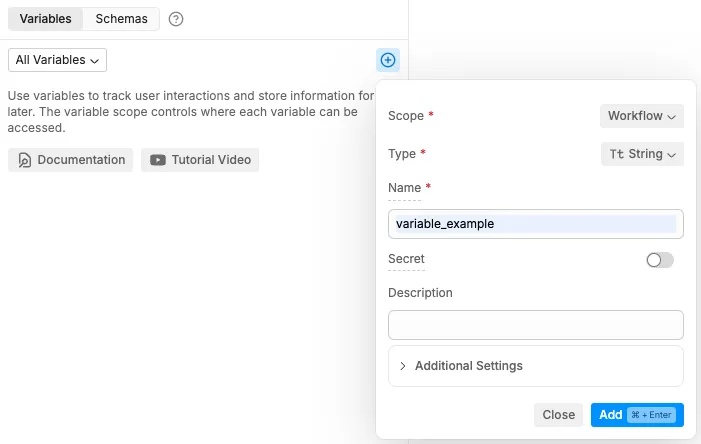
By default, variables are empty when created. However, you can create them with a default value if you prefer—just specify a Default Value in the Additional Settings menu.
Assign a value to your variable
A freshly created variable is like an empty box—you need put something inside it before you can use it. This is called assigning a value to your variable.
Studio will usually indicate where you have the option to assign a value to a variable.. For example, in a Capture Information Card:
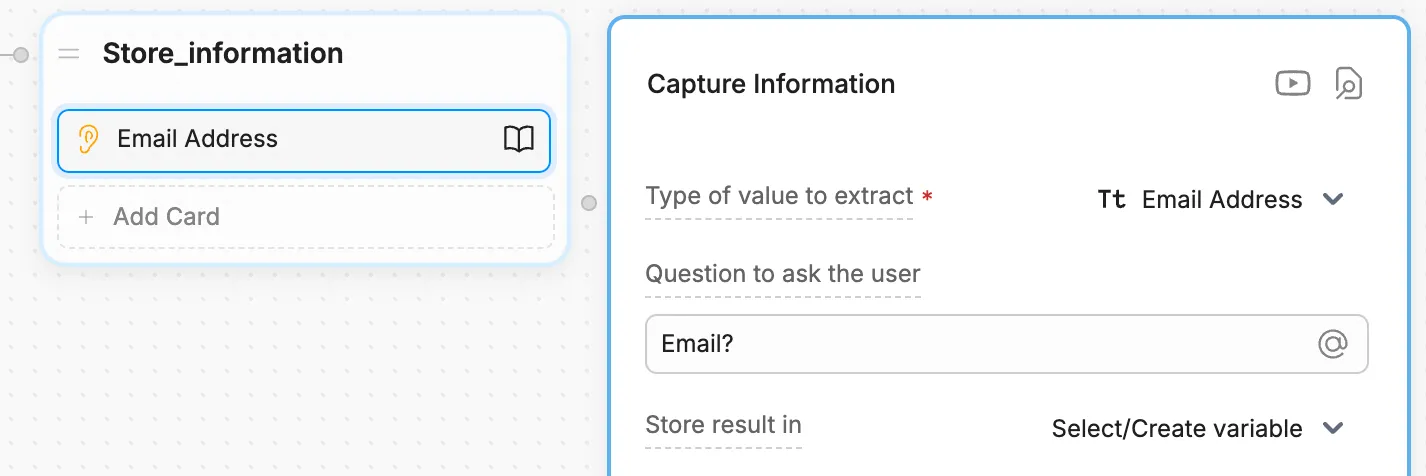
If you want more control over when and how you assign a value to a variable, you can use code instead.
Read your variable
When you need to access the information stored in a variable, you can read it. This is like opening the box and looking at what’s inside.
Each variable scope is read differently. Check out the section for your variable’s scope for more information.
Data types for variables
Botpress variables are typed, meaning they’re limited in what data they can hold. These data types are important to:
- Ensure the code behind Botpress runs smoothly
- Help AI tasks generate better results
Here are the different data types available for Botpress variables:
Type | Description |
|---|---|
String | Values that are treated as text. Strings can contain any amount of letters, numbers, or special characters. |
Boolean | Variables can be true or false, with a lowercase ‘t’ or ‘f’. |
Number | Variables that are numeric, either with or without decimal places. |
Date | Variables that are a single date or date and time. Botpress uses ISO 8601 date/time format, such as |
Object | Variable that’s a collection of key-value pairs. Useful when dealing with code and written like |
Array | Variable that’s a collection of other, similar variables. Arrays can contain strings, like |
Enum | Variable that can be one of a set number of choices. |
Pattern | Variable that uses Regular Expressions/Regex to store a special pattern. This pattern can match certain words or numbers. |